Worker App
Proof workers were on-site
Geofence and QR clock-in give agencies confidence that hours are accurate — with alerts when something looks wrong.
- GPS geofence per job location
- QR check-in for indoor or shared sites
- Late arrival and missed shift alerts
- Break logging against scheduled limits
Watch
See it in under a minute
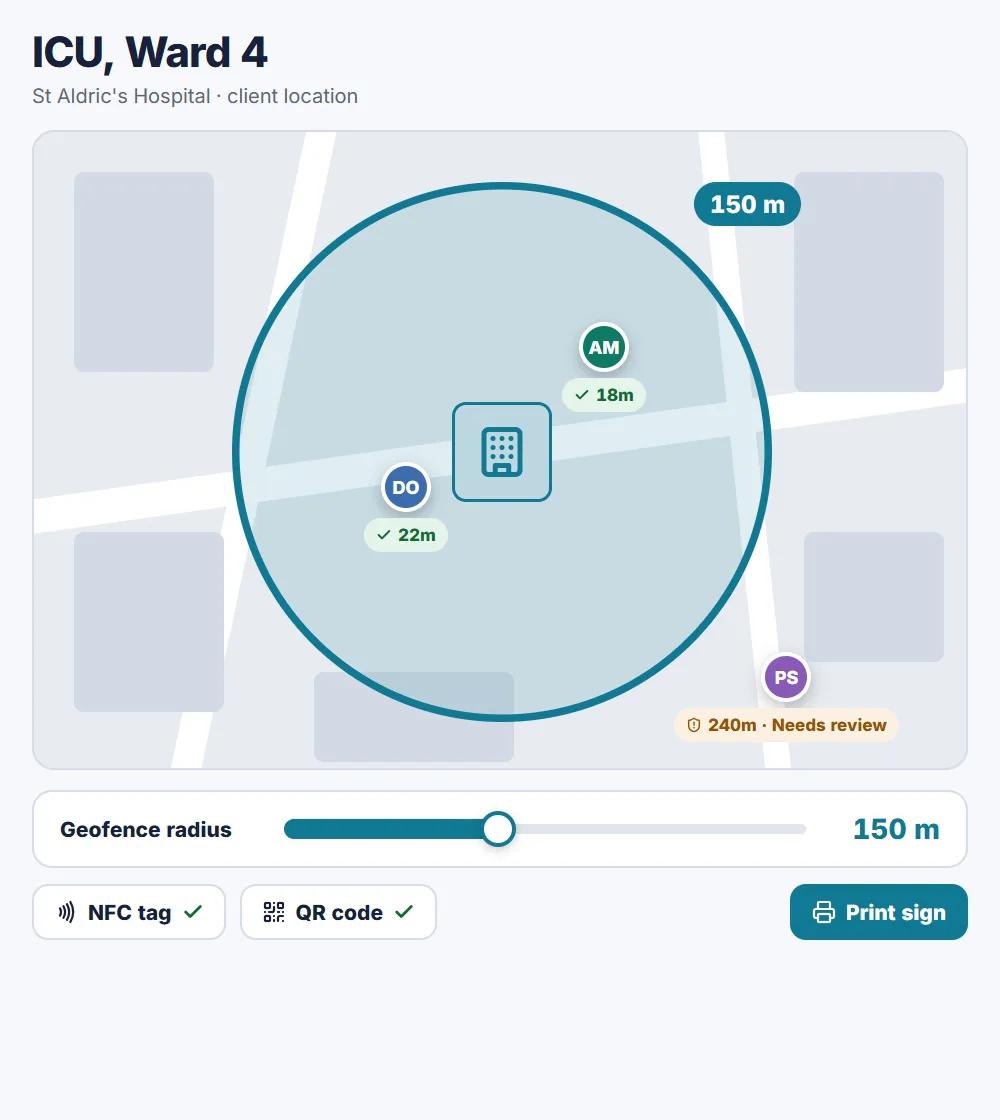
A "Tap to clock in" sign at the door, a location check against the client site, and an attendance view you can approve or override.
- NFC tap or QR scan, on any phone
- Geofence radius set per client location
- Early shown in grey, late in amber
- Every override needs a reason and is logged
Capabilities
What you get with Clock-in & attendance on MyBellon.
Geofenced clock-in
Workers can only clock in within the designated site boundary.
QR alternative
Scan a location QR when GPS alone isn't enough.
Manager alerts
Instant notifications for late, early, or missed punches.
Attendance reports
Compare scheduled vs actual hours for payroll readiness.
Related features
Timesheets & sign-off
Workers submit and sign timesheets on-site. Agencies review, approve, and export records for payroll and audits.
Learn moreWorkMix
Shifts, clock-in, timesheets, and messages — WorkMix is the mobile-first worker app by MyBellon.
Learn moreScheduling & rotas
Plan weekly schedules, assign staff to shifts, and publish updates in real time — without spreadsheets or group chats.
Learn moreSee clock-in & attendance in action
Join the early pilot or watch the live demo — no inflated metrics, just a product you can try today.
Watch the live demo, no account needed